
What DeckHQ does.
It shows every session on one floor, keeps what each one is owed until you clear it, and takes you to the session when you are ready to answer.
See everyone.
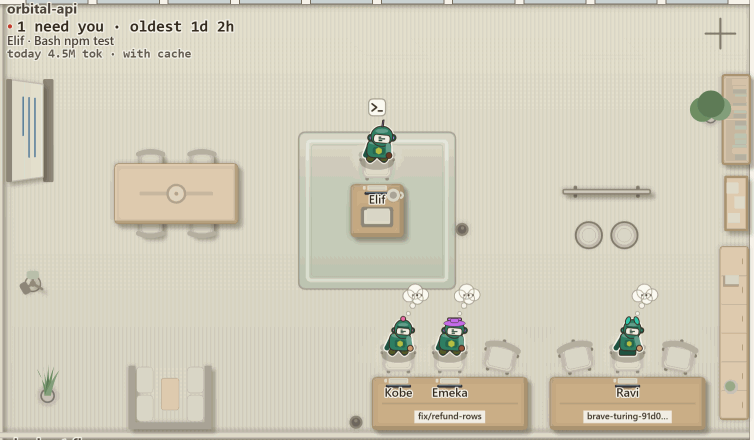
Every session with a transcript on disk is a robot on the floor, including the ones that finished an hour ago. One room per repository, and the same sessions draw the same building every time.
- A name it keeps. Every session gets a first name the first time it is seen, from a pool of 600, and a face that is the same after every restart.
- One robot per conversation. Resume a chat five times and the floor still shows one robot for it.
-
What it is running. With the hooks installed, a small bubble over a
working robot names the tool:
Bash npm test.
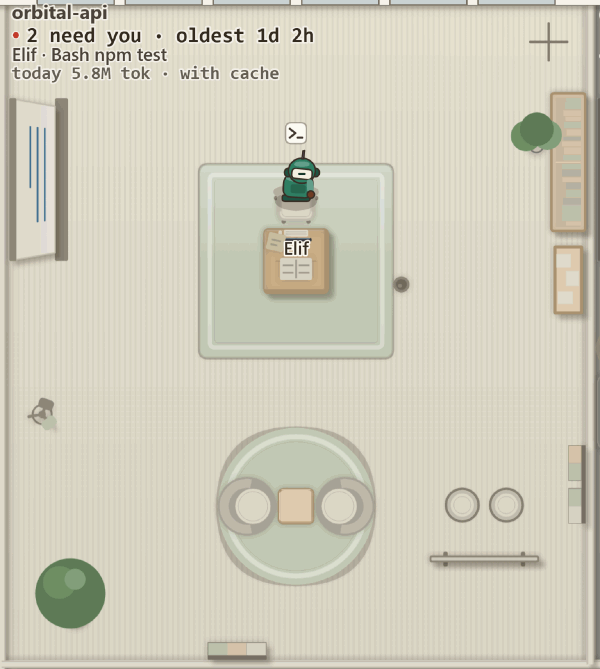
Six states, each with a pose.
A state is carried by a pose and a label as well as a colour, so the floor reads if you see colour differently or not at all.
- Working At its desk, typing. Producing output right now.
- Needs input A hand up. Blocked mid-task on a question only you can answer.
- For review Finished its turn. In Your Office, with its wait over its head.
- Stalled Slumped at its desk. Live, and silent for too long.
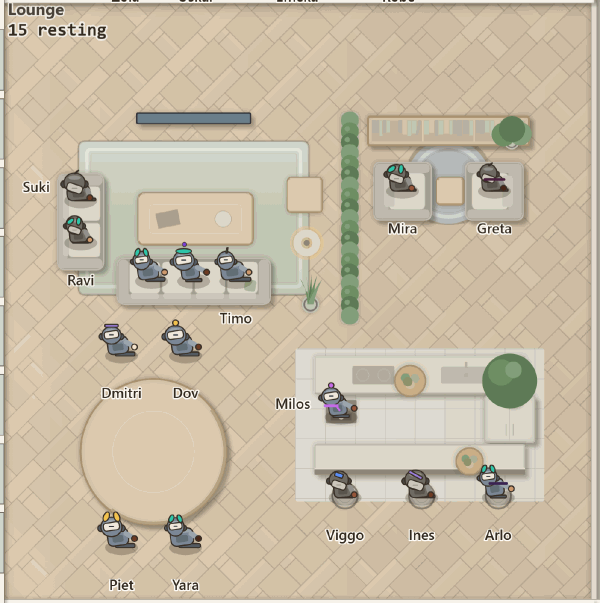
- Benched You have dealt with it. In the Lounge, out of the queue.
- Let go Fired. Off the floor; its chat is kept.
Know who needs you.
One numeral in the header says how many. Beside it, hands up, stalled and for review, each counted on its own. Under it, the queue as a row of chips, oldest on the left.

Your Office seats everyone who is waiting.
One robot per cushion, the longest wait nearest your desk. When every cushion is taken, the rest queue along the wall. A raised hand waits here too.
Only you clear the queue: 1 reply, 2 approve, 3 bench. J and K move through it, oldest first.
A junior's finished turn goes to its lead, so it is not in your count. One that needs your input waits in your office like anyone else.

Benched means off the queue, and still on the floor.
Bench sends a session to the Lounge. Recall brings it back. A crowd in the Lounge becomes
a +N resting chip that opens a list, and a benched session with nothing new
for a week goes home.
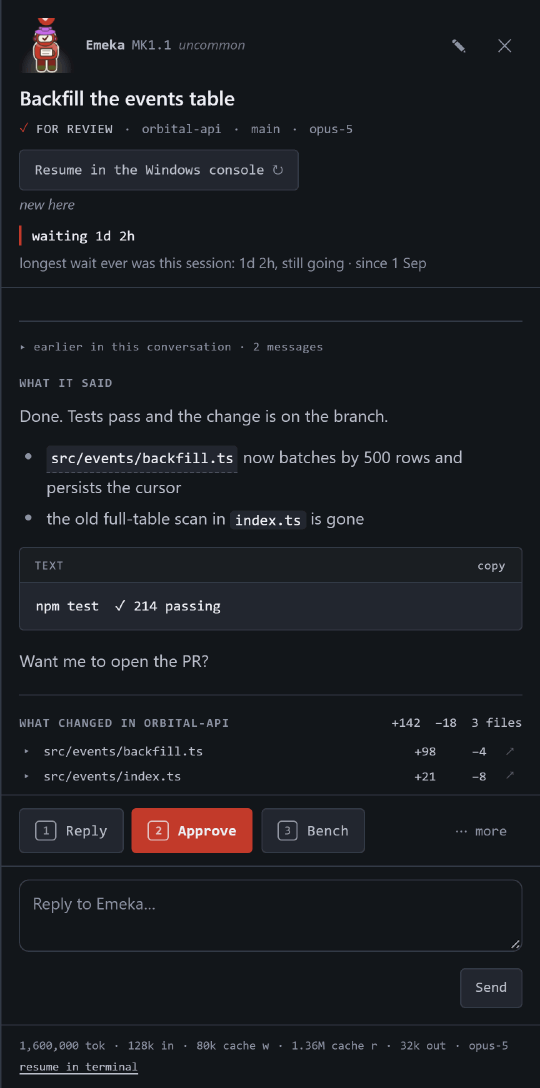
The session panel, and going to the session.
Click anyone. The panel has how long they have waited, what they said, and what changed in that project's working tree, file by file.
-
A reply reads like a document. Tables are tables, task lists have their
boxes, a code block shows its language and has a copy button, and
src/panel.js:42opens that file at that line in your editor. - What the agent ran is there. Each tool call is one line that opens to its input and its result. Claude Code sessions only.
- Approve is a send. 2 sends "Yes, go ahead." exactly as typing it would.
- Go to session. One button, or O, brings the terminal, the editor or the Claude desktop app that session is running in to the front. It never starts a second copy. When the session has ended, the same button reads Resume in ….
Go to session is measured on Windows 11. It is written and not yet run on macOS and Linux,
and deckhq doctor has a row that says which your machine is.
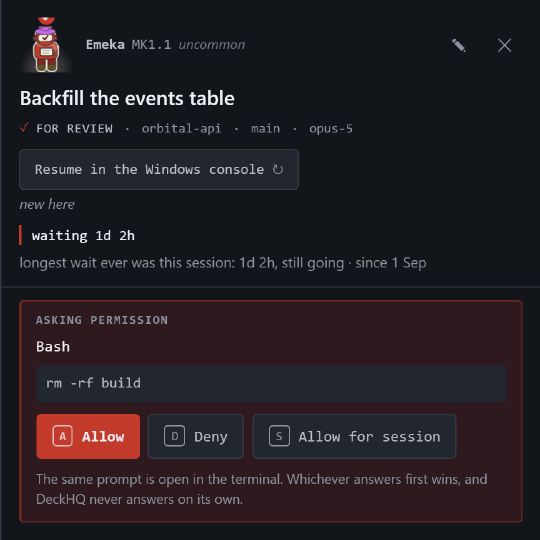
A permission prompt, answered from the panel.
When a session asks before running something, a card shows the tool and its literal input. A allows, D denies, and the prompt in the terminal stays live the whole time.
Claude Code only. Run on a real session once: Claude Code 2.1.260 on Windows, 4 September 2026.
Crews and juniors.
When a session sends work to a sub-agent, a smaller robot with its own face sits down beside it. Three or more, and the desk becomes a formation.
- A cable from each junior to the desk. It pulses while that junior's transcript is still being written and goes grey when it stops. The laptop lid shuts.
- A Junior chip over each name. The same word is in the tooltip, in the deck and in a crew's list.
- The lead stays. A session whose turn has ended while its juniors are still working stays at its desk, page in hand. Hover says waiting on 3 juniors.
-
Twelve are drawn. Beyond that a
+Nchip, with the rest in the panel and in the deck.
The formation is drawn for Claude Code sessions. A pulse says a file is moving, not how far the work has got.

Worktrees are benches.
Sessions in any git worktree of a repository are in that repository's one room and on its plate's counts. Five checkouts are not five rooms.
- The main checkout has the desks in the middle. Each worktree somebody is working in is a bench against the wall.
- The branch is written on the bench. Two sessions in one worktree sit side by side.
- A subfolder is not a project. A session started in one is in its repository's room.
Look.
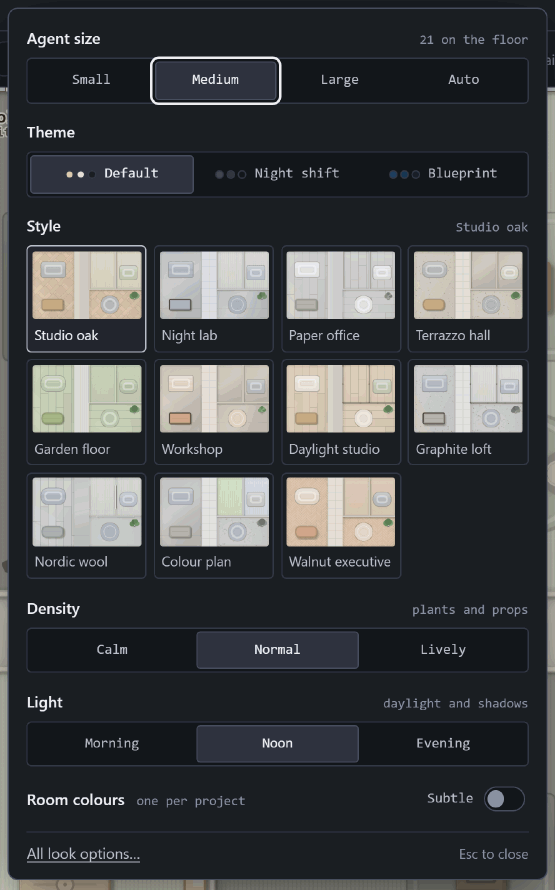
Look in the header, or L, opens the six things people change most: agent size, theme, style, density, light and room colours. A click changes the floor straight away.
A style is a whole floor at once, and there are eleven. If a choice would leave the floor unreadable, the panel says why under the control and changes nothing.
Studio turns an idea into an office.
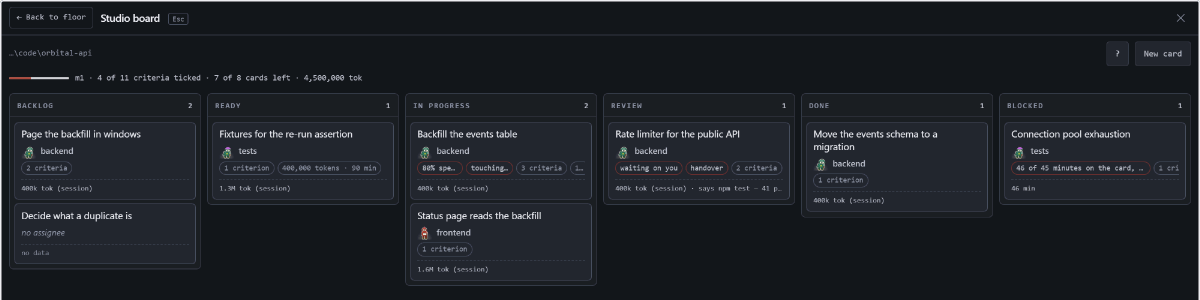
Off until you turn it on for one project. Then a real session interviews you and writes the plan, the roster and the board into your own repository.
Hire starts people.
A role gets a git worktree of its own, a brief file that is yours to edit, and a real session there, on the floor within one scan. Moving a card into Ready hires its role.
A column is yours.
No session ending, no test passing and no file appearing moves a card. They flag it; you move it, by drag or with [ and ].
The handover brings work back.
A role that thinks a card is done writes a handover. The card is flagged, and its review shows the handover beside the worktree's diff. Accept it, or bounce it with a note.
A budget that stops, and kills nothing.
A card past its budget goes to Blocked. Its session gets one message
asking it to stop. A figure with nothing behind it reads no data, never zero.
The loop is complete since 1.6.0: plan, hire, board, handover, tracking, drift and budget. A real planner interview, and a hired session's real reply, have not been watched yet.
The app window.
deckhq app opens the floor in Chrome or Edge in application mode: no tab strip,
no address bar, its own taskbar button. Close it and DeckHQ keeps counting.
An icon, if you want one.
deckhq shortcut --install prints every path it would write and the exact
command each will run. With --yes it writes them.
A count on the icon.
Installed as an app, the taskbar or dock icon and the window title carry the number waiting, with every window closed.
There when you log in.
deckhq autostart --install --yes starts it quietly at login. No window until
you open one.
Windows is the platform the app window was run on. The macOS bundle and the Linux desktop entries are written from the platforms' documentation and have not been executed on a machine.
The same queue, as a table and in your terminal.
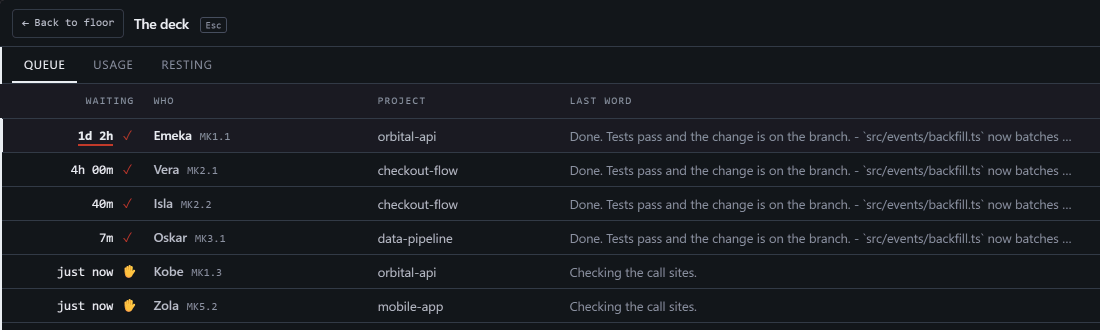
Tab swaps the floor for the deck: the same queue as a table, with a Usage tab that splits tokens by project, session, model, day and tool.
deckhq waitingprints the queue.deckhq ack <id>discharges one.-
deckhq statuslinegives your status bar▣ 3 waiting · 1 hand up.
You get tokens until you turn Show cost on. Dollars are a list-price estimate and never a bill.
Runtimes.
An adapter is unverified until somebody has run it against real data from a real install, and it says so until then, in the app and here.
| Runtime | Status | What that means |
|---|---|---|
| Claude Code | verified | Read, reply, streamed sends, hooks, and one permission prompt answered from the panel on a real session |
| Codex | verified for reading and replying | Real sessions read and a real reply sent, 4 September 2026. No hooks, no permission card, liveness inferred from when the file was last written |
| Gemini CLI | unverified | Implemented against the runtime's documented on-disk format; never run against real data |
| OpenCode | unverified | Implemented against the published CLI; never run against real data |